Stay Updated with the Latest Insights and Tips
Welcome to our blog page! At 222 Websites, we share valuable content designed to help your business thrive in the digital world. From web design trends to SEO strategies and digital marketing tips, our blog is your go-to resource for staying informed and ahead of the competition.

Who Owns Your Small Business Website and Domain? What Your Website Designer Should Hand Over
Who Owns Your Small Business Website and Domain? What Your Website Designer Should Hand Over
Most small business owners never think about who owns their website until something goes wrong. The designer stops answering emails. The hosting bill goes up and you can't move. You try to change one phone number and realize you don't have access. Then you discover that the domain name with your business name in it isn't registered to you.
It doesn't have to go that way. A website isn't one thing. It's a bundle of accounts, files and rights. When you know what's in the bundle and who controls each piece, you can work with any website designer with confidence and leave if you ever need to. This guide covers what small business website ownership really means, who actually owns your website and domain name, what to ask before you hire, and what you should have in hand when the project is done.
This article is general information, not legal advice. For contracts and copyright questions, talk with an attorney.
Why Website Ownership Matters
For a small business, your website and domain are often tied to everything else: your email address, your business listings, your ads and your printed materials. If someone else controls those pieces, they effectively control part of your business.
Ownership problems usually come from convenience rather than bad intent. A designer registered the domain "to save you a step," sets up hosting in their own account, or creates analytics under their own email. Years later, when you want to make a change, you find out the website owner on paper isn't you, and that convenience becomes a roadblock.
The Pieces of a Small Business Website
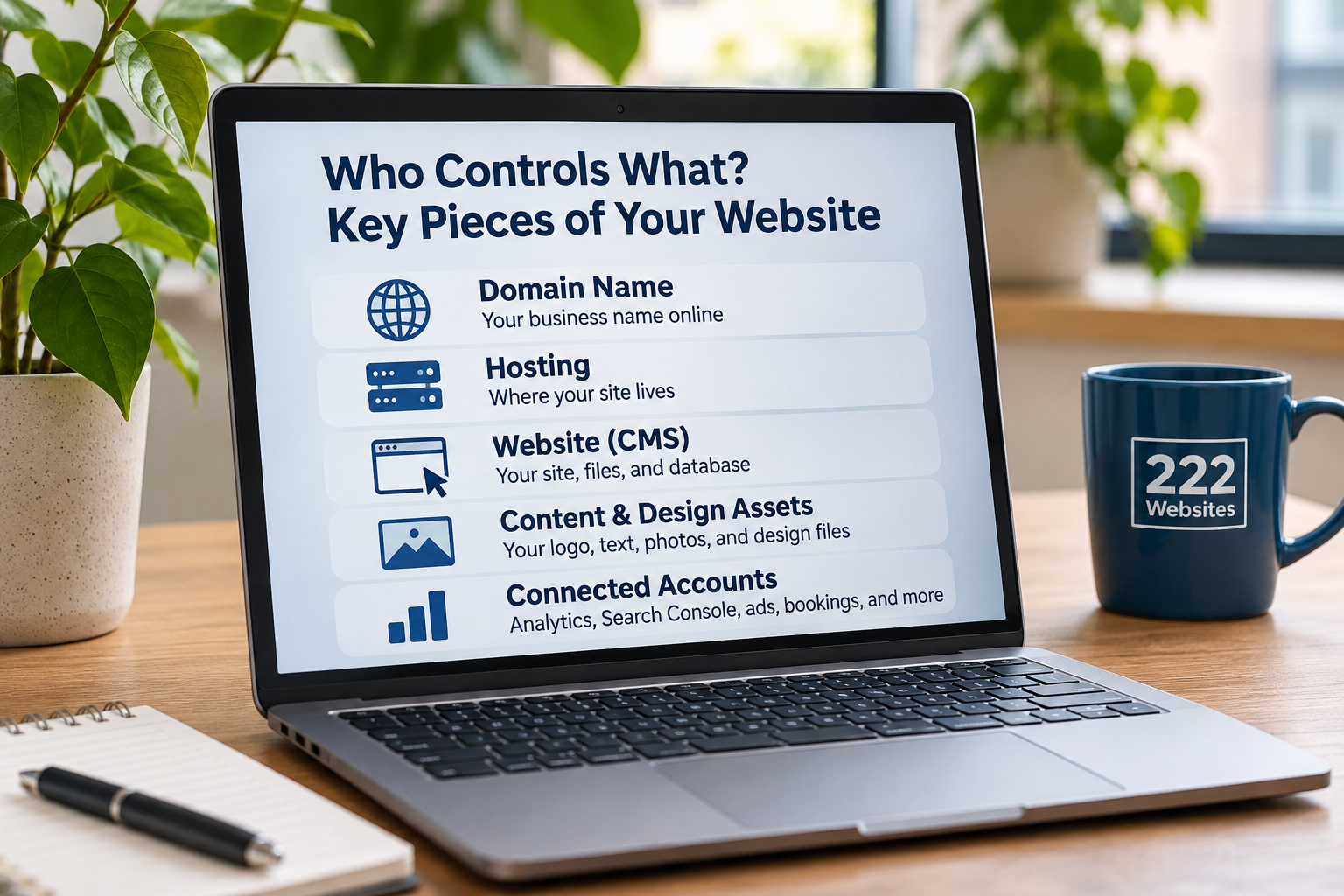
Your domain name
Your domain name is the most important piece. Whoever controls it controls where your website and, often, your email point. Every domain registration is held with a company called a domain registrar, under a named registrant, who is the domain owner. Ideally, the registrant should be you or your business, and you should have your own access to the domain registrar account.
You can look up a domain's public registration details with a WHOIS search, such as ICANN's free lookup tool at lookup.icann.org. Privacy services often hide the registrant's name and contact information, so a hidden result doesn't tell you much on its own.
Hosting
Hosting is where your website's files live. Some designers include hosting in a monthly plan, which is common and can be very convenient. The key questions are whose account the site lives in and what happens if you ever want to move it.
The website itself
This is your content management system (CMS), the site files and the database. Find out whether you have your own administrator account, not just limited editor access, and whether you can get a full copy or export of the site if you leave.
Content, photos and design files
You'll want your logo files, written content, and photos stored somewhere you control. Be aware that stock photos and fonts are often licensed, not owned, and some licenses belong to whoever bought them. Ask what you're licensed to keep using.
Accounts connected to your website
Your analytics, Google Search Console, ad accounts, booking tools, payment processors, and your Google Business Profile should be owned by your business, with your designer added as a user, not the other way around.
Questions to Ask a Website Designer Before You Sign
Ask these before any work starts, and get the answers in writing:
Whose name will the domain registration be in, and will I have my own access to the domain registrar account?
Where will the site be hosted, and whose account will it be in?
Will I get my own administrator account on the website?
If I stop working with you, what do I get to keep, and how does the handoff work?
Who owns the design, written content, and code you create for me?
Are any photos, fonts, or plugins licensed in your name? What happens to them if I leave?
Will analytics and other accounts be set up under my business, with you as a user?
A good website designer will answer these quickly and plainly. If the answers are vague, or if leaving would mean losing your domain, take that as a warning sign. For more on vetting a designer, see our guide on how to choose the right website designer.
Subscription Websites and Ownership
Monthly website plans, where design, hosting, and updates are bundled together, are popular with small businesses because they avoid a high upfront cost. That model can work very well. It just means ownership questions deserve a clear answer up front, because some pieces, like hosting and the platform the site runs on, may stay with the provider while others, like your domain and content, may be yours.
Neither approach is automatically better. What matters is that you know which is which before you sign. If you're weighing the two models, our post on subscription websites vs. traditional web design is a good place to start.
Your Website Handover Checklist

When the site launches, or any time you want to check where things stand, confirm you have:
Domain name: registrant listed as you or your business, current contact information on the domain registration, and your own domain registrar login
DNS: access to your DNS settings, or at least a written record of them
Hosting: your own login, or a clear written explanation of how the site can be moved
Website admin: your own administrator account under your business email
Files: logo files, final written content, and your own photos saved somewhere you control
Licenses: a list of any paid themes, plugins, fonts, or stock photos, and who holds each license
Accounts: owner or admin access to analytics, Google Search Console, and your business listings, under a business email you control
Renewals: a list of renewal dates and who pays for the domain, hosting, and any tools
Recovery: password reset and two-factor codes going to you, not to someone who might leave
Store all of this somewhere safe, like a password manager, and make sure more than one trusted person in your business can reach it.
What to Do If Your Website Designer Won't Hand Things Over
If you're already stuck, try these steps in order:
Ask in writing. Politely request access to the domain registrar account or a domain transfer, admin access, and copies of your files. Many designers will cooperate once asked.
Check what you already control. Look through old invoices and emails for registrar, hosting, and analytics accounts in your name.
Contact the domain registrar directly. If the domain is in your name, the registrar's account recovery process may get you back in. If it isn't, registrars can sometimes help when you can show proof of your business and payment, but that's not guaranteed.
Rebuild if you need to. Anything visible on your live site, like your text and photos, can usually be recreated on a new site you fully control.
Get legal advice if there's a real dispute over the domain or your content.
Frequently Asked Questions
Does my website designer own my website?
Who owns your website depends on what you agreed to and how things were set up. Often, the domain, hosting, files and copyright are handled separately, so you may own some pieces and not others. Check your contract, look up your domain's registration and ask your designer directly.
How do I find out who owns my domain?
Run a WHOIS search on your domain, for example with ICANN's lookup tool, and check the registrant and registrar. If privacy protection hides the details, sign in to your registrar account if you have one, or ask your designer to confirm in writing who the domain owner is.
Is it bad if my designer hosts my website?
Not at all. Many small businesses prefer it. Just make sure you know whose account the site lives in, what's included, and how you'd move the site if you ever needed to.
What's the most important thing to own?
Your domain name. Your website, email, and online listings usually depend on it, and it's the hardest piece to replace if you lose it.
Should I ask for all of this even if I trust my designer?
Yes. Good designers expect these questions, and having your own access protects both of you if people, businesses, or circumstances change.
Work With a Website Designer Who Gives You Clear Answers
You shouldn't need to be technical to understand who controls your website. Before hiring a designer, make sure you understand what's included, which accounts you'll have access to, and what happens if you ever decide to move your website elsewhere.
At 222 Websites, we help small businesses build professional websites without unnecessary complexity. Our website design services are built around making it easier for business owners to establish a strong online presence.
We're located at 222 Capitol Street, Suite 522, in Charleston, West Virginia. If you're planning a new website or have questions about your existing one, get in touch with our team. We're happy to explain how our website plans work and what to expect.

Ready to rank on page one? You need SEO services drive qualified organic traffic to your business.
Need a high-converting website? Explore our professional website design services built to scale your business.
Both services are designed to build your foundation to get found and grow.
Unleash Your Business Brilliance.
Your Online Success Starts Here
© 2026 222 Websites - All Rights Reserved